
Last modified July 28, 2026
Authentication deep dive: from your MCP client to the Kubernetes API
You can configure several different MCP servers in Claude Code (or Cursor, and other MCP clients), and these MCP servers may or may not require authentication. For example, you may want to investigate the state of a Kubernetes cluster using mcp-kubernetes, which requires Kubernetes authentication. The challenge here is to keep the user identity through the whole communication, so at the very end, the requests to the Kubernetes API carry the user identity (and permissions).
To centralize access to MCP servers, we’ve created Muster: an MCP gateway in front of other MCP servers, that’s itself an MCP server.
How do users authenticate with Muster
When you open Claude Code and a new session starts, Claude Code connects to your configured MCP servers in the background. It runs the MCP lifecycle against each one: the initialize handshake, then the capability-discovery calls (tools/list, prompts/list, resources/list). This is because Claude Code needs to know what tools/prompts/resources (in MCP language) are available for the session that you just started.
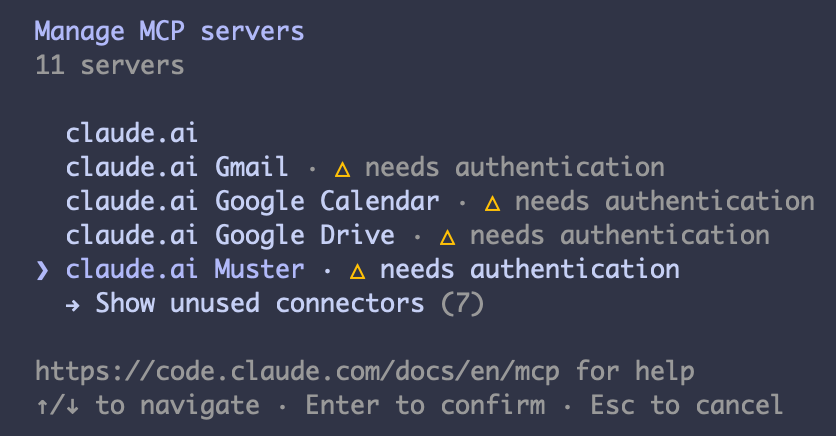
MCP servers will respond back to Claude Code with the information. And the ones that require authentication will respond with a 401 Unauthorized HTTP response. This lets Claude Code know that it needs to send authenticated requests, meaning that the user needs to log in. That’s why when you run the /mcp command in Claude Code, you’ll see the “needs authentication” message next to an MCP server. To log in, you just need to select the MCP server from the list. Doing it will start the OAuth authentication flow.
Muster is itself the Authorization Server for MCP clients like Claude Code. Behind the scenes, it delegates the actual user authentication to Dex. Muster is registered as a client of Dex, which lets us plug in different identity providers (Dex connectors) like Google or Azure without changing the architecture.
What happens when you start the OAuth flow to log in to Muster
Claude Code → Muster
When Claude Code gets a
401 UnauthorizedHTTP response, the response carries aWWW-Authenticateheader pointing at the server’s metadata. That header is how Claude Code discovers the Authorization server (AS) and its endpoints. Using that information, Claude Code (the client) opens your browser at Muster’s/oauth/authorize, identifying itself with itsclient_id. For MCP clients, thatclient_idisn’t a pre-registered value but a URL the client controls (see “How Claude Code becomes a client without pre-registration” below).Muster → Dex
Muster doesn’t know your password and doesn’t want to. Instead of showing a login form, it redirects that same browser onward to Dex’s
/authendpoint. Now Muster acts as Dex’s client, using the client_id/client_secret that was pre-registered for Muster in Dex’s configuration (astaticClientsentry in Dex’s config. Muster reads its copy from its own config).Dex → the upstream identity provider
Dex is doing the exact same trick one level deeper: it’s an AS to Muster but a client of the identity provider, for example Google. Each Dex “connector” holds a client_id/secret registered with the upstream identity provider. It redirects the browser to the identity provider’s login page.
User logs in
You type your password at the identity provider login page, and only there. Neither Dex, nor Muster, nor Claude Code ever sees it.
The chain unwinds
The identity provider redirects the browser back to Dex’s callback with a code. Dex exchanges it (authenticating with its identity provider / connector
client_secret), mints its own tokens, and redirects the browser to Muster’s/oauth/callbackwith a new code. Muster exchanges that code at Dex’s/tokenendpoint, authenticating with Muster’s Dexclient_secret, and receives the Dex ID token. Muster then redirects the browser one last time to Claude Code’s localhost callback with yet another code. When Claude Code exchanges that code, Muster mints and returns its own access token.Why does every hop hand over a code instead of a token? The code is the only credential that travels through the browser, where it can end up in address bars, history, and logs. So it’s designed to be low-value: it can be used once, it expires within seconds, and it’s worthless on its own. Redeeming it requires the client’s own credentials (its
client_secret, or the PKCE verifier for public clients like Claude Code). The actual tokens only travel on direct server-to-server calls (the “back channel”) and never pass through the browser.
After the OAuth flow is finished, you are logged in to Muster. In reality this means that Claude Code received an access token from Muster (an opaque token, a random string that Muster generated). Muster keeps a map with the tokens that it generated, using the token as key, and the tokens from Dex as value (ID token, access token, and refresh token). That way Muster knows which user is associated with the access token. The token response also carries a copy of the upstream Dex ID token, as any OIDC token response does. Claude Code has no use for it and authenticates with the opaque token only, but other clients rely on it (see the agents section below).
Now that you are logged into Muster, you can start doing tool calls from Claude Code, which will include Muster’s access token on every request to Muster.
The login flow: one browser, three redirects, one password. Step numbers match the five steps described earlier.
(public client) participant B as Browser participant M as Muster
(Authorization Server) participant D as Dex
(Muster's identity provider) participant IdP as Upstream IdP
(GitHub / Azure) CC->>M: MCP request (no token) M-->>CC: 401 + WWW-Authenticate (metadata URL) CC->>B: open Muster /oauth/authorize
client_id = CIMD URL, PKCE challenge B->>M: GET /oauth/authorize M-->>B: redirect to Dex /auth
(Muster acting as Dex's client) B->>D: GET /auth D-->>B: redirect to IdP login page B->>IdP: user types password — only here IdP-->>B: redirect back to Dex callback + code B->>D: deliver code D->>IdP: exchange code (connector client_secret) IdP-->>D: user identity confirmed D-->>B: redirect to Muster /oauth/callback + new code B->>M: deliver code M->>D: exchange code at /token (Muster's Dex client_secret) D-->>M: Dex ID token + access token + refresh token M-->>B: redirect to localhost callback + final code B->>CC: deliver code CC->>M: exchange code + PKCE verifier M-->>CC: Muster access token (opaque) Note over M: stores map:
Muster token → Dex token set Note over CC: Claude Code authenticates to Muster
with the opaque token only
OAuth clients
In OAuth terms, the client is the application that requests tokens, and the user never types a password into it. A client redirects the user’s browser to the Authorization Server (AS) and waits for the browser to return a one-time authorization code. It then exchanges that code for tokens over a back-channel call, identifying itself with its own credentials (client_id + client_secret for confidential clients like Muster). Public clients like Claude Code have no secret and use PKCE instead—see below. Any application can be a client in one relationship and an AS in another. For example, Claude Code is a client of Muster, which is an AS to Claude Code but a client of Dex.
How Claude Code becomes a client without pre-registration
The same team that deploys Muster also deploys Dex. They can feed a client_id/client_secret to both so that Muster (the client) can identify itself when talking to Dex, and Dex can check if the credentials are correct. But Muster’s team can’t know every MCP client that will ever connect.
So MCP clients identify themselves using Client ID Metadata Documents (CIMD). The client_id is an HTTPS URL, controlled by the client’s vendor, hosting a JSON document that describes the client (its name, its redirect URIs). When Muster receives an authorization request with a URL-shaped client_id, it fetches that document and treats it as the client’s registration. Nothing is stored ahead of time, and no secrets are exchanged between Muster’s team and the client’s vendor. This has two useful properties. First, client identity is anchored to domain ownership: only Anthropic can serve a document under an anthropic.com URL. So a malicious app can’t credibly present itself as Claude Code. Second, every installation of the same client shares the one client_id (the URL), so Muster keeps no per-laptop registration state.
Note: Muster also supports the older mechanism, Dynamic Client Registration (RFC 7591), as a fallback for clients that don’t publish a metadata URL. The client POSTs its description to /oauth/register and receives a server-generated random client_id.
Being an OAuth client grants zero privilege either way: every token still requires a human logging in through the browser chain.
Public clients like Claude Code get no client_secret. Instead, each login is protected by PKCE: the client sends a hash of a one-time secret up front and reveals the secret only when redeeming the code. That way an intercepted code is unusable.
How does Muster validate the tokens from Claude Code
When a request with the opaque bearer token arrives, Muster will try to validate the token by checking several different things.
Does the Muster session artifact still exist and hold
Muster will try to find the token in the token storage. If the token isn’t found, or it has expired or it has been revoked, the validation fails. This enables the system to perform instant-revocation: killing the store entry ends the session now.
Is the underlying Dex session still alive
The stored Dex token is checked for expiry. If it’s expired but a Dex refresh token exists, Muster refreshes against Dex right there. If Dex refuses the refresh (for example, user deprovisioned, session revoked at the IdP) the request fails. So if users are removed at the upstream identity provider (Google / Azure / etc.), their access will be cut off when the Dex token expires. This happens even though Muster’s own artifacts (first check in this list) haven’t expired.
Does Dex vouch for the user right now
On every request coming from MCP clients, Muster will call the
/userinfoendpoint in Dex to check if the Dex access token is still valid at the Dex level. This catches revocation at Dex immediately (session deleted or revoked at Dex). Note that this check only proves the session is still alive at Dex. A user removed at the upstream identity provider (Google / Azure) isn’t visible to/userinfo. Dex itself only finds out the next time it refreshes against the upstream, which is check 2 described earlier. Each layer vouches for itself in real time. News from the upstream layer arrives at refresh time.Was this token minted for this server
When Muster mints an access token, it records in its storage which resource the token was requested for (its own resource URI—this is OAuth’s “resource indicator,” RFC 8707). At validation time Muster checks that binding, so a token minted for a different resource server is rejected even if it’s otherwise valid.
Recap: the actors in the login.
| Actor | OAuth roles | What it holds when the login ends |
|---|---|---|
| Claude Code | Public client of Muster (CIMD client_id, PKCE, no secret) | The Muster access token (opaque) and a Muster refresh token—nothing else |
| Browser | Front channel: carries redirects and one-time codes between all parties | Nothing (codes are one-time and already spent) |
| Muster | Authorization Server for MCP clients; confidential client of Dex | The map: Muster token → Dex token set (ID, access, refresh) |
| Dex | Authorization Server / OIDC provider for Muster; client of the upstream IdP | The user’s Dex session and its own record of the upstream login |
| The upstream IdP (GitHub / Azure) | Where the human actually authenticates | The password—it never leaves this hop |
Recap: the tokens in the login. For each token, the two questions that matter: who it’s about, and who it’s addressed to.
| Token | Issued by | About | Addressed to | Held by | Validated by |
|---|---|---|---|---|---|
| Authorization codes (×3, one per hop) | Each AS in the chain | One login attempt | The client of that hop | In transit only (one-time, short-lived) | The AS that issued them, at code exchange (+ PKCE on the public hop) |
| Muster access token (opaque) | Muster | The user (via Muster’s store) | Muster (resource binding recorded in the store) | Claude Code | Muster (checks 1–4 described earlier) |
| Muster refresh token | Muster | The user’s session | Muster | Claude Code | Muster (rotation, 30-day session window) |
| Dex ID token (JWT) | Dex | The user (sub, email, groups) | muster (+ dex-k8s-authenticator via cross-client audience) | Muster, server-side | Downstream: mcp-kubernetes and the kube-apiserver, via Dex’s JWKS |
| Dex access token | Dex | The user’s Dex session | Dex itself (spent at /userinfo) | Muster, server-side | Dex, on every /userinfo call (check 3) |
| Dex refresh token | Dex | The user’s Dex session | Dex itself | Muster, server-side | Dex, on refresh (check 2)—this is where upstream deprovisioning surfaces |
What do these tokens actually look like
Muster’s access token is opaque: a random string with no internal structure. Look at an example of what Claude Code sends on every request:
Authorization: Bearer 3q7xKQm9vN1sYwZk8pR2tLc4bH6dJfA0uEgi5CnMoPw
There is nothing to decode. All its meaning lives in Muster’s storage. Conceptually, the record that this string points at looks like this:
{
  "user": "user@giantswarm.io",
  "audience": "https://muster.example.gigantic.io/mcp",   // the RFC 8707 binding from check 4
  "expires_at": 1751638200,                               // 30 minutes after minting
  "dex_tokens": {
    "id_token": "eyJhbGciOi...",
    "access_token": "...",
    "refresh_token": "..."
  }
}
The Dex ID token is different: it’s a JWT, three base64url-encoded segments separated by dots (header, payload, signature). Look at an example of an ID token, raw form first, then the first two segments decoded (annotated):
eyJhbGciOiJSUzI1NiIsImtpZCI6IjM5N2ExYmM0In0 . eyJpc3MiOiJodHRwczovL2RleC5leGFtcGxlLmdpZ2FudGljLmlvIiwic3ViIjoi... . pXm4T9rQeK1s...
// header: which key signed this, so validators can pick it from the JWKS
{ "alg": "RS256", "kid": "397a1bc4" }

// payload: the claims
{
  "iss": "https://dex.example.gigantic.io",    // who minted it        (Issuer check)
  "sub": "CiRqb3NlQGdp...",                    // opaque Dex user handle
  "aud": ["muster", "dex-k8s-authenticator"],  // who may consume it   (Audiences check)
  "azp": "muster",                             // which client actually requested it
  "email": "user@giantswarm.io",               // who it is about
  "groups": ["giantswarm:admins"],             // what kubernetes RBAC will evaluate
  "iat": 1751636400,                           // minted at
  "exp": 1751638200                            // expires at           (Expiration check)
}
Two things worth noticing. First, base64url is an encoding, not encryption: anyone holding this token can read every claim. The signature (the third segment) prevents modification, not reading. Second, each claim maps to one of the checks in “How are Dex’s ID tokens validated” below. iss, aud and exp are the envelope. email and groups are the identity that will reach the Kubernetes RBAC evaluation and audit log.
Now, look at what Claude Code redeems when the access token expires:
POST /oauth/token
grant_type=refresh_token
refresh_token=vR8kLm2wQx9pT4nYc7bJf1sHd6gK3aZe0uMoXiCnPwE
The refresh token is opaque too, and single-use: each redemption returns a fresh access token and a new refresh token (rotation). All rotations of one login belong to the same family in Muster’s storage, so revoking the family kills the whole session at once. This is how a 30-minute access token turns into a session that survives for days without asking you to log in again.
Dex’s access and refresh tokens are opaque strings too, meaningful only to Dex itself.
mcp-kubernetes
Let’s say that, now that you are logged in, you want to use MCP tools from the mcp-kubernetes MCP server. mcp-kubernetes is another of those MCP servers that require authentication. And it’s configured as an MCP server behind Muster. In that configuration, we tell Muster to send the ID token that it got from Dex when you logged in whenever it wants to use tools from mcp-kubernetes. (We set forwardToken: true to use the forward downstream mode.) This is because mcp-kubernetes shares Muster’s identity provider: they both use the same Dex instance.
In this scenario, Muster will receive a request from Claude Code with the access token that it created when you logged in. Then Muster will look it up in its storage, and it will use the Dex ID token associated with that access token, when sending requests to mcp-kubernetes.
mcp-kubernetes will validate Dex’s ID token. And if it’s valid, it’ll send requests to the Kubernetes API using the token. Giant Swarm management clusters are configured to use Dex as identity provider: the same Dex instance that muster and mcp-kubernetes are using (workload clusters are different—see the impersonation section below). This means that Kubernetes will receive the request with Dex’s ID token, and it will validate the token. If it’s a valid token, Kubernetes just enforces RBAC using the user identity from the ID token. The user’s identity survives the entire chain: the audit log will record the human identity that performed the action (not Muster or mcp-kubernetes).
First, the token-custody view: what each participant is, and which token travels on each hop.
Claude Code / Cursor — speaks MCP, holds an OAuth session with muster.
Validates the access token (store lookup, Dex liveness, audience binding), then swaps it for the user's Dex ID token.
⇄ signs the id_token at login · answers
/userinfo liveness checks on every request⇄ store / look up the Dex token set (ID, access, refresh) by access_token
Validates the ID token offline via Dex's JWKS — its aud must be in trustedAudiences — then forwards it to the Kubernetes API.
OIDC authN from the token's claims (aud = dex-k8s-authenticator) + RBAC authZ on the user's groups. The audit log records the human.
And the sequence view: the same tool call in forward mode, with the order of operations and round trips.
Bearer: Muster access token (opaque) M->>M: store lookup:
token → session + Dex tokens M->>D: GET /userinfo (liveness check) D-->>M: user still valid M->>MK: forward tool call
Bearer: Dex ID token
aud = [muster, dex-k8s-authenticator] MK->>MK: validate via Dex JWKS
aud "muster" in trustedAudiences MK->>K: Kubernetes API request
Bearer: same Dex ID token K->>K: validate via Dex JWKS
iss + exp + aud "dex-k8s-authenticator" K->>K: RBAC evaluated as the human user K-->>MK: response — audit log records the human MK-->>M: tool result M-->>CC: tool result
Recap: the actors in a tool call.
| Actor | Role in this flow | What it validates |
|---|---|---|
| Claude Code | Sends the tool call with the Muster access token | Nothing—it trusts the TLS channel to Muster |
| Muster | Gateway: resolves the opaque token to the session, swaps in the Dex ID token | The Muster token (checks 1–4, including the /userinfo liveness call) |
| Dex | Signs the ID token; answers liveness queries; issuer of record | Its own access token, on every /userinfo call |
| mcp-kubernetes | Resource server: accepts the forwarded token, calls the Kubernetes API | The Dex ID token: signature (JWKS), iss, exp, aud listed in its trustedAudiences |
| kube-apiserver | Final enforcement point: authentication, RBAC, audit | The Dex ID token: signature (JWKS), iss, exp, aud = dex-k8s-authenticator; then RBAC on the user’s identity |
Recap: the tokens on each hop.
| Hop | Bearer token on the wire | Type | Validated by |
|---|---|---|---|
| Claude Code → Muster | Muster access token | Opaque (a store key; carries no data) | Muster: store lookup + Dex liveness + audience binding |
| Muster → mcp-kubernetes | Dex ID token, aud = [muster, dex-k8s-authenticator] | Signed JWT | mcp-kubernetes, offline via Dex JWKS + trustedAudiences |
| mcp-kubernetes → kube-apiserver | The same Dex ID token | Signed JWT | kube-apiserver, offline via Dex JWKS + --oidc-client-id; then RBAC |
Using a different Dex instance
As explained earlier, the whole workflow works because muster, mcp-kubernetes and Kubernetes all use the same Dex instance as identity provider. But what happens if we want to send requests to the Kubernetes API of a different cluster than the one Muster runs on? That cluster uses a different Dex instance.
All Giant Swarm management clusters have their own Dex instance, different from each other. Dex allows federating different instances, and in our current architecture we’ve federated all our Dex instances. In this setup, other instances of Dex have a connector configured to trust the source Dex (the one used by Muster). Client credentials for Muster are also registered at the target Dex instances.
Once everything is set up, we can do a token exchange between two federated Dex instances, making a target Dex trust ID tokens coming from Muster’s Dex.
In practice, this means that Muster doesn’t send Dex’s ID token to mcp-kubernetes as explained earlier. Instead, Muster performs a token exchange between its local Dex and the Dex instance acting as the target Kubernetes cluster identity provider. (The local Dex is the Dex instance acting as Muster’s own identity provider.) When configuring mcp-kubernetes behind muster, instead of using the forward downstream mode, we configure the exchange mode, which needs the target cluster’s coordinates:
auth:
  tokenExchange:
    enabled: true
    dexTokenEndpoint: <target Dex's token endpoint>
    expectedIssuer: <target Dex's issuer URL>
    connectorId: <the connector in the target Dex that trusts our Dex>
    clientCredentialsSecretRef: <muster's client credentials at the target Dex>
Each field maps to something described earlier. The endpoint is where the exchange request goes, the connector is the federation trust edge, and the credentials are Muster’s client registration at the target Dex. The endpoint and the issuer are separate fields because they answer different questions. dexTokenEndpoint is where the request travels (which may be a proxy or tunnel address when the target cluster is private). expectedIssuer is the name the target Dex puts inside its tokens (iss claim): its public identity, unchanged regardless of the path the request took. They only happen to match when the target Dex is reached directly.
When does the exchange happen? At login, not at tool-call time. While Muster is completing your OAuth flow, it proactively connects every SSO-configured backend, performing the token exchange for each backend in exchange mode. (This happens the moment Muster mints your access token, before Claude Code has even received it.) By the time your first tool call arrives, the exchanged token normally already exists. And because exchanged tokens are short-lived while your session isn’t, Muster automatically repeats the exchange whenever the current token approaches expiry.
At this point, Muster has the ID token from the target Kubernetes cluster’s Dex instance. Muster uses that new ID token when sending requests to mcp-kubernetes deployed on the target Kubernetes cluster. From there, everything works exactly the same as explained earlier: the only difference is which ID token was used.
Muster also keeps the exchanged tokens in a cache, keyed by (target Dex endpoint, connector, user), the user being the sub claim. Within a token’s lifetime, reconnections and other backends targeting the same cluster reuse the cached token instead of triggering a new exchange.
Here’s the token-custody view of exchange mode—same shape as the earlier forward diagram. The differences are the ID token now minted by the target Dex, and everything below Muster living on the target cluster.
Claude Code / Cursor — unchanged: it never notices which mode a backend uses.
Validates the access token as before — but the target cluster trusts a different Dex, so muster forwards an ID token exchanged at the target Dex (RFC 8693) instead of the local one.
⇄ login & liveness, as in
forward mode · its id_token is now only the exchange input⇄ RFC 8693 exchange at
dexTokenEndpoint · validates the source token via the source Dex's JWKS, mints a new id_tokenValidates the exchanged token via its own local Dex's JWKS — no cross-cluster trust needed at this hop.
OIDC authN against its local Dex + RBAC authZ on the user's groups. The audit log records the human — same as before.
The sequence view shows how the exchange itself works: the same user, re-issued by an issuer the target cluster trusts. This runs during login (and again whenever the exchanged token nears expiry), not on every tool call. Note the direction of the JWKS fetch (target Dex → source Dex), and that every validator on the target management cluster only ever talks to its own local Dex.
(source MC) participant DS as Dex
(source MC) participant DT as Dex
(target MC) participant MK as mcp-kubernetes
(target MC) participant K as kube-apiserver
(target MC) Note over M: holds the user's ID token
from the source Dex (login) M->>DT: RFC 8693 token exchange at dexTokenEndpoint
subject = source ID token, connectorId, client credentials DT->>DS: fetch discovery + JWKS
(connector trusts source Dex) DS-->>DT: signing keys DT->>DT: validate subject token,
mint new ID token (same user, own iss/aud) DT-->>M: exchanged ID token M->>M: check iss == expectedIssuer, cache it
keyed by (endpoint, connector, sub) M->>MK: tool call
Bearer: exchanged ID token MK->>K: API request with the same token K->>K: validate against local (target) Dex
RBAC as the human user Note over DT,K: everything on the target MC validates
against its own local Dex — no cross-cluster JWKS
The other strategy: Impersonation instead of token forwarding
Forwarding the user’s ID token all the way to the Kubernetes API is one strategy. mcp-kubernetes also supports a second one: impersonation. In this mode, mcp-kubernetes talks to the Kubernetes API using its own service account credentials, but adds Impersonate-User and Impersonate-Group headers derived from the validated token’s email and groups claims. Kubernetes then evaluates RBAC as if the human had made the call: the user’s ID token never reaches the API server at all. This is the default for Cluster API workload clusters in the Giant Swarm platform (the management-cluster flow described earlier uses token forwarding). The user identity still survives the chain. The audit log shows the service account impersonating the human, so actions remain attributable and additionally distinguishable as agent-driven.
Why is impersonation the default for workload clusters? Unlike management clusters, Giant Swarm workload clusters don’t come with Dex configured as the identity provider of their API server—their authentication configuration belongs to the customer. Token forwarding requires the target API server to trust our Dex, so that prerequisite isn’t guaranteed on a workload cluster. What is guaranteed is a credential: Cluster API creates an admin kubeconfig for every workload cluster and stores it on the management cluster. mcp-kubernetes uses that credential, restricted to impersonation, and projects the user’s identity through the impersonation headers. This works on any workload cluster regardless of how its authentication is configured.
Skipping Muster’s OAuth flow: Bringing a Dex token directly
Everything so far assumed the MCP client is interactive: when Muster answers 401, the client can open a browser, a human logs in, and the redirect chain delivers tokens back. But Muster isn’t always the first hop. Some customers put their own gateway in front of Muster—for example, an Amazon Bedrock-based gateway that talks to Muster on behalf of its users.
Why can’t that gateway just log in to Muster like Claude Code does? The main reason is client registration. A gateway like Bedrock’s authenticates outbound the classic OAuth way: you configure it with a client_id and client_secret pre-registered at the authorization server. It then uses those credentials to obtain tokens. Muster can’t be that authorization server, because Muster has no static client registry by design. As described earlier, its clients identify themselves via CIMD (a URL-shaped client_id) or dynamic registration. Both are public clients with PKCE, and both are designed around an interactive authorization-code flow with a human in the browser. There is simply no client_secret Muster could hand out for the gateway to be configured with.
Dex is a different story. Dex supports exactly this kind of client—a staticClients entry with a pre-registered client_id and client_secret (it’s how Muster itself is registered in Dex). So the gateway gets registered as its own Dex client, authenticates its users on its side, and obtains a per-user Dex ID token. That’s the login chain from the beginning of this document, minus Muster. That also matches the shape of the problem: the gateway multiplexes many users over its connection to Muster. So what it needs is a per-user credential to attach to each request, not one interactive Muster login.
So the question becomes: can Muster accept a Dex-issued ID token as the bearer token, without the client ever having gone through Muster’s own /oauth/authorize?
Yes—this is opt-in via Muster’s oauth.server.trustedAudiences configuration (empty by default: deny-by-default, like every trust decision in this document). When a bearer token arrives, Muster first looks at its shape. If it’s a JWT whose aud claim contains one of the configured trusted audiences, Muster validates it and accepts the request. It validates the token exactly the way every other validator in this document validates a Dex ID token (signature via Dex’s JWKS, issuer, expiration, audience). Only tokens that don’t match this path fall through to the opaque-token lookup (checks 1–4 described earlier).
Note the audience discipline replaying once more: the gateway logs in to Dex under its own client_id, so by default its tokens would say aud: the-gateway, not something Muster trusts. Muster’s config can list the gateway’s audience in trustedAudiences. Alternatively, the gateway uses Dex’s cross-client feature (trustedPeers, described below) to request tokens that also carry the audience Muster expects.
Downstream, nothing changes. The incoming Dex ID token takes the place of the one Muster would have gotten from its own login flow. In forward mode it’s sent to backends verbatim, and in exchange mode it becomes the subject token of the RFC 8693 exchange. The user identity in its email and groups claims flows through to Kubernetes RBAC and the audit log exactly as before.
With a direct Dex token, the gateway runs its own login against Dex, then presents the resulting ID token straight to Muster. Muster’s own OAuth endpoints are never involved:
(e.g. Bedrock-based) participant D as Dex participant M as Muster participant MK as mcp-kubernetes GW->>D: own OAuth flow (gateway's client_id)
user authenticated upstream D-->>GW: Dex ID token
aud incl. a Muster trustedAudience GW->>M: tool call
Bearer: Dex ID token (JWT) M->>M: JWT? aud in trustedAudiences?
validate via Dex JWKS: sig + iss + exp + aud M->>MK: forward / exchange
same as the normal flow Note over M: no store entry, no refresh token:
valid until the JWT's exp, then 401
What you give up compared to the normal flow is the machinery that hangs off Muster’s token store—each of the four validation checks has a different fate:
| Check (from the opaque-token flow) | With a direct Dex token |
|---|---|
| 1. Store artifact exists / not revoked | Not applicable—there is no store entry, so Muster-side instant revocation doesn’t exist on this path |
| 2. Dex session refresh | No refresh token—when the JWT expires Muster answers 401, and the gateway must bring a fresh token from Dex |
3. /userinfo liveness | Not performed—validation is purely offline (JWKS), so the token stays valid until exp regardless of what happens at Dex during that window |
| 4. Minted for this server (RFC 8707 binding) | Replaced by the aud ∈ trustedAudiences check |
The security consequence is worth stating plainly: with this enabled, any JWT signed by the configured Dex with a trusted audience is a valid Muster credential. Session control shifts entirely to Dex token lifetimes and to whoever guards that audience—keep the trustedAudiences list short, and keep the ID token lifetime at Dex short too.
Backends with a different identity provider: Outbound OAuth (github-mcp)
Every downstream mode so far (forward, exchange, impersonation) reuses the Dex identity the user logged in with. That works because the backends trust Dex (directly, or via a federated Dex). But some backends don’t speak Dex at all. github-mcp, the GitHub MCP server, needs to call the GitHub API—and GitHub only honors GitHub credentials. No amount of forwarding or exchanging a Dex token produces a GitHub token: GitHub is a separate authorization server with its own user database.
For this case Muster has a fourth downstream mode, enabled with auth.type: oauth on the backend’s MCPServer resource: the OAuth proxy. Here Muster becomes an OAuth client of the backend’s authorization server (GitHub), on behalf of the user—exactly the role Claude Code plays towards Muster, one level further down. Instead of translating the inbound identity, Muster runs a second, independent authorization-code flow against the external provider and keeps the resulting token next to the user’s session.
The flow is triggered the same way everything in OAuth is: by a 401. When Muster connects to the backend and gets 401 Unauthorized, it marks the backend as Auth Required. It then discovers the backend’s authorization server from the response (RFC 9728 protected-resource metadata). That’s the same discovery mechanism Claude Code used against Muster at the top of this document. For backends that don’t publish it, the operator pins the issuer via auth.authorizationServer in the MCPServer spec. The user then triggers the login—by calling the core_auth_login tool that Muster exposes, or muster auth login --server <name> from the CLI. Muster builds an authorization URL at the external provider (with PKCE and a server-side state, as usual) and returns it in the tool result. The user opens it and consents at GitHub. GitHub then redirects the browser back to Muster’s /oauth/proxy/callback, where Muster exchanges the code for the GitHub token.
On the wire, the RFC 9728 discovery half of that looks like this. The 401 carries a WWW-Authenticate header pointing at the backend’s protected-resource metadata:
The backend’s 401 response—its WWW-Authenticate header names the metadata URL:
HTTP/1.1 401 Unauthorized
WWW-Authenticate: Bearer resource_metadata="https://github-mcp.example.gigantic.io/.well-known/oauth-protected-resource/mcp"
Muster fetches that document, and it answers the two questions the flow needs: who is the authorization server and what scopes to ask for:
The protected-resource metadata document (annotated):
GET https://github-mcp.example.gigantic.io/.well-known/oauth-protected-resource/mcp

{
  "resource": "https://github-mcp.example.gigantic.io/mcp",  // the resource this metadata describes
  "authorization_servers": [
    "https://github.com/login/oauth"                      // where users log in — muster builds the
  ],                                                      // authorization URL against this AS
  "scopes_supported": ["read:project", "repo"],           // the scopes muster requests
  "bearer_methods_supported": ["header"]                  // deliver the token as Authorization: Bearer
}
By design, this is the exact same header and document that Muster serves to Claude Code at the top of this document. Every MCP server in the chain advertises its authorization server the same way. Only the AS it names differs. The auth.authorizationServer pin in the MCPServer spec exists for backends that don’t publish this document: it supplies the same two answers (issuer and scopes) from configuration instead.
Note the two callback endpoints Muster now serves, one per direction: /oauth/callback is Muster acting as a client of Dex during inbound login, and /oauth/proxy/callback is Muster acting as a client of external providers for outbound auth. For identifying itself outbound, Muster prefers the same mechanism Claude Code uses inbound: it self-hosts a Client ID Metadata Document at <public URL>/.well-known/oauth-client.json and uses that URL as its client_id. Providers that don’t accept CIMD and require pre-registered apps (GitHub among them) get a pre-registered client_id via Muster’s oauth.mcpClient.clientId configuration instead.
From then on, every tool call the user makes to that backend carries the external token. Muster resolves the inbound Muster access token to the session as always, finds the stored GitHub token for it, and sends it as the bearer to github-mcp. github-mcp then uses it against the GitHub API. Outbound tokens are stored per login session × issuer × scope, so they’re per-user (never shared between users). By design, they’re shared across backends that use the same provider: log in to GitHub once, and every GitHub-backed server behind Muster works. When the provider issues a refresh token, Muster refreshes the external token automatically as it approaches expiry. When it can’t, the backend’s 401 flips it back to Auth Required and the user logs in again.
Here’s the token-custody view of oauth mode—same shape as the forward and exchange diagrams. The token on the lower hops now has nothing to do with Dex.
Claude Code / Cursor — unchanged, as always: it only ever holds the muster token.
Validates the access token as always — but the backend trusts GitHub, not Dex, so muster attaches the GitHub token it obtained in the outbound authorization-code flow.
⇄ inbound login & liveness only — plays no role on the outbound hop
⇄ user consents once in the browser · code exchanged at
/oauth/proxy/callback · mints the github tokenUses the token against the GitHub API — the user's own GitHub permissions apply.
AuthN and authZ are GitHub's: the boards the user's GitHub account can see are the boards the tools can see.
The sequence view shows the outbound authorization-code flow: triggered by a 401 from the backend, driven by the core_auth_login tool, landing at /oauth/proxy/callback. This runs once per login session, not on every tool call.
(external AS) participant P as github-mcp M->>P: connect (no token) P-->>M: 401 + resource metadata → server is "Auth Required" CC->>M: core_auth_login (github-mcp)
Bearer: Muster access token M-->>CC: tool result: authorization URL
(PKCE, state, redirect_uri = /oauth/proxy/callback) Note over GH: user opens the URL,
consents at GitHub GH-->>M: browser redirect to /oauth/proxy/callback + code M->>GH: exchange code (+ PKCE verifier) GH-->>M: GitHub access token (+ refresh token) Note over M: stored per login session × issuer × scope CC->>M: tool call
Bearer: Muster access token M->>P: tool call
Bearer: GitHub access token P->>GH: GitHub API call as the user
One identity note: on this path, the identity that reaches the backend is the user’s GitHub identity—whoever consented in the browser—not the Dex email/groups. The two are linked only by living in the same Muster session. Authorization and auditing at the far end are GitHub’s: github-mcp acts with the permissions of the user’s GitHub account. This also means users see exactly the repositories their own GitHub account can see—an improvement over a shared service PAT.
Recap: choosing a downstream mode.
| Mode | Token sent to the backend | Use when |
|---|---|---|
forward | The user’s Dex ID token, verbatim | Backend trusts the same Dex instance as Muster (management-cluster MCP servers) |
exchange | An ID token minted by the target cluster’s Dex (RFC 8693) | Backend lives on a cluster with its own, federated Dex |
| impersonation (in mcp-kubernetes) | mcp-kubernetes’ own credential + Impersonate-* headers | The target API server doesn’t trust any Dex (workload clusters) |
oauth (OAuth proxy) | A token from the backend’s own provider (for example GitHub) | Backend authenticates against a third-party provider unrelated to Dex (github-mcp) |
Agents in the cluster: Acting on behalf of a human
Everything so far assumed a human with a browser. But agents running inside the platform (for example kagent pods) also use MCP tools through Muster, and they have no browser and no password. They also shouldn’t act as themselves: an agent works on behalf of a human, and the Kubernetes API should see that human’s identity, not a generic bot.
The way this works today is simpler than you might expect: the agent acts with the human’s own Dex ID token. A human links their identity to the agent platform with a one-time browser login against Muster, for example from Slack. When that happens, Muster’s token response contains, alongside its own opaque access token, the upstream Dex ID token. The gateway in front of the agent keeps the Muster refresh token as the durable link. On every task it obtains a fresh Dex ID token through that session and hands it to the agent as the human’s credential. The opaque Muster access token is never forwarded to the agent: it’s not a JWT and carries no identity an agent-side validator could read.
The agent then calls Muster’s /mcp with the human’s Dex ID token as its bearer. Muster accepts it at the front door the same way it accepts any externally presented Dex token—through the direct-Dex-token path described earlier. That means a JWT whose audience is in trustedAudiences, validated offline against Dex’s JWKS. From there, everything is exactly the human flow. forward mode sends the token to backends byte-identical, exchange mode uses it as the subject of the cross-cluster exchange, and the Kubernetes API sees the human.
The agent’s bearer—the human’s Dex ID token, unchanged. Note what’s missing:
{
  "iss": "https://dex.example.gigantic.io",
  "sub": "CiRqb3NlQGdp...",              // the human
  "aud": ["muster", "dex-k8s-authenticator"],
  "email": "user@giantswarm.io",         // the human
  "groups": ["giantswarm:admins"],       // the human's groups
  "exp": 1751638200
                                         // ...nothing identifies the agent
}
That last line is the honest limitation of the current model: at the token level, the agent is invisible. The Kubernetes audit log shows the human, exactly as if they had used Claude Code themselves. Telling agent-driven actions apart requires the gateway’s and Muster’s own logs. The gateway compensates on its side of the boundary: on the agent channel it never falls back to a service-account credential. A task that reaches the agent without a human token is a hard error, so nothing ever runs as “the platform” by accident.
The agent path today is the human’s Dex ID token, end to end. No exchange, no new token, no agent identity:
(e.g. klaus-gateway) participant A as Agent
(kagent) participant M as Muster Note over GW: holds the human's linked Muster session
(refresh token, from a one-time browser login) GW->>M: redeem refresh token M-->>GW: opaque access token + Dex ID token GW->>A: task + the human's Dex ID token A->>M: /mcp tool calls
Bearer: Dex ID token M->>M: JWT, aud in trustedAudiences?
validate via Dex JWKS M->>M: then forward / exchange,
exactly as in the human flows
Because the downstream half is identical to the human flows, the token-custody picture is the mcp-kubernetes diagram from earlier with the agent in Claude Code’s place. The Dex ID token is on the first hop as well.
Recap: the actors in an agent session.
| Actor | Role in this flow | Notes |
|---|---|---|
| The human | Not present, but the token is theirs—subject, email, groups | Their Kubernetes RBAC governs everything the agent can do, via the same paths as their own logins |
| Gateway (for example klaus-gateway) | Holds the human’s linked Muster session; resolves a fresh Dex ID token per task | Stores the refresh token encrypted at rest; never substitutes a service-account credential on the agent channel |
Agent (for example kagent) | Executes the task using the human’s Dex ID token as its bearer | Appears in no token claim; visible only in gateway/Muster logs |
| Muster | Validates the token via Dex’s JWKS (trustedAudiences) and forwards/exchanges as in the human flows | No store entry, no refresh chain behind such a session: valid until the token’s exp |
Recap: the tokens in an agent session.
| Token | Issued by | About | Held by | Role |
|---|---|---|---|---|
| Muster refresh token | Muster | The human’s linked session | Gateway (encrypted at rest) | The durable link; redeemed per task |
| Muster access token (opaque) | Muster | The human | Gateway only | Gateway-internal (userinfo lookups); never forwarded |
| Dex ID token | Dex | The human—and only the human | Gateway → agent, per task | The credential for the whole downstream journey |
mcp-prometheus
Authentication towards mcp-prometheus works identically.
mcp-oauth
Muster and our MCP servers are full Authorization Servers (in OAuth terms). Because they all have to expose the same HTTP endpoints and implement the same logic to manage the different tokens, we’ve extracted all that code to a library called mcp-oauth.
How are Dex’s ID tokens validated
As discussed, the MCP servers, the Kubernetes API server, or other federated Dex instances will receive Dex’s ID tokens, and they need to validate that these tokens are valid. There are several different things that need to be validated.
Signature
Dex’s ID tokens are signed JWT tokens, signed with Dex’s private key. Dex generates and automatically rotates its signing keys. The public key for that private key can be used to validate that our Dex instance was the one signing the token. The public key is published as a JWKS document: anyone with access to the JWKS document can validate the signature.
Issuer
Servers that need to validate a JWT token are configured with which issuer to expect on the tokens. They will check if the iss field on the JWT matches the configured issuer.
Expiration
Servers will also check if the JWT tokens have an expiration field, and whether the token has expired.
Audiences
When tokens are minted, an audience is set in the token, representing who’s supposed to use the token.
As explained earlier, Dex is configured as the identity provider in Giant Swarm management clusters. In the Kubernetes API server flags, we specify which audience Kubernetes should expect in the tokens it receives (using the --oidc-client-id=dex-k8s-authenticator flag). That way, the Kubernetes API server can check if the received ID token has the expected audience or not when validating.
But in our scenario, muster is the one requesting tokens from Dex. If the token only contains audience: muster, Kubernetes would reject the ID token due to having the wrong audience. To work around this, when muster requests tokens from Dex it requests to include the audience that Kubernetes expects in the audience field of the token. Dex then mints the token with both audiences.
Can any client just request tokens addressed to any other client? No, this is Dex’s cross-client audience feature, and it’s deny-by-default. The target client’s Dex config must explicitly list the requester in its trustedPeers config.
Similarly, mcp-kubernetes is configured to accept tokens that contain muster in the audience field, via the trustedAudiences list in mcp-kubernetes configuration. This is empty by default (deny-by-default: each aggregator is an explicit entry).
The same audience discipline appears one more time, in the token exchange scenario. When Muster exchanges tokens with a target Dex, the target Dex is itself a validator of an incoming ID token—one whose audience is muster, not the target Dex. It accepts it because its connector is explicitly configured with which audience to expect on incoming tokens: Muster’s client id at the source Dex. This trust is provisioned per management cluster rather than built in: a Dex instance only becomes an exchange target once its connector and exchange credentials are deployed. In practice, we provision every Giant Swarm management cluster this way, so agents and MCP clients can reach mcp-kubernetes on all clusters. The mechanism itself stays opt-in and deny-by-default. A Dex instance has no audience of its own as an issuer. Like every other validator in this document, it accepts exactly the audiences its configuration names, and nothing else.
And the audience story then replays on the target side for the exchanged token. For it to be accepted by the target Kubernetes API server, Muster requests the dex-k8s-authenticator audience during the exchange. The target Dex only grants that because its own trustedPeers configuration allows it—exactly the cross-client mechanism described earlier, mirrored on the target management cluster.
Related pages
Need help, got feedback?
We listen to your Slack support channel. You can also reach us at support@giantswarm.io. And of course, we welcome your pull requests!